
The Best Japan Itinerary Builder for a Multi-City Trip: Is Premium Worth It?
A useful Japan trip planner should turn scattered ideas into days that work. See how our itinerary builder organizes a multi-city route and when Premium earns its place.
In this article
Affiliate disclosure: Some links in this article may earn Japan Trip Planners a commission at no extra cost to you. Recommendations are included when they are genuinely useful for planning, and you should still compare current prices, terms, and official provider information before booking.
What Is the Best Japan Trip Planning Tool for a Multi-City Itinerary?
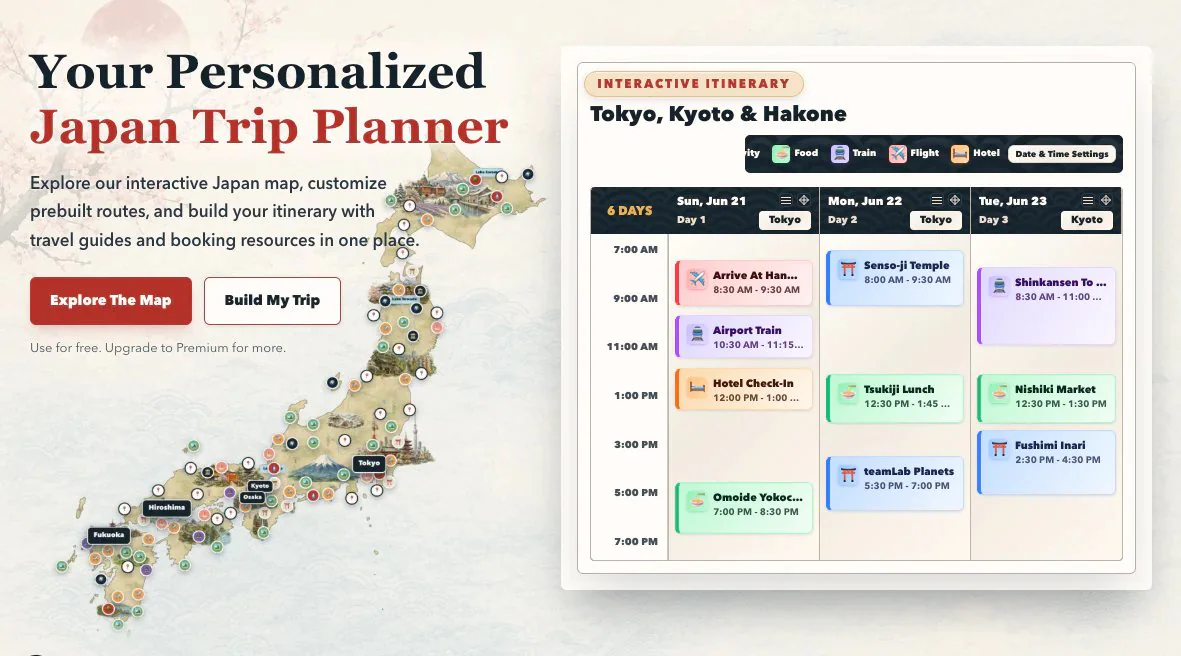
The best Japan itinerary builder is one that helps you turn places you want to visit into days you can actually enjoy. We designed Japan Trip Planners for that job: organize a day-by-day calendar, explore places on an interactive map and keep your route, practical notes and useful resources together. Paid Premium adds tools for travelers who want more flexibility than a single working plan.
This is our explanation of our own product, not an independent ranking or an award claim. A planner is worth paying for when its features solve a problem you genuinely have. If the free calendar already organizes your trip comfortably, there is no need to upgrade just because the journey crosses several cities.
Below, we work through a Tokyo, Kyoto, Osaka and Hiroshima example and explain where the extra features help. The aim is not a longer checklist. It is a route with realistic transfers, clear commitments and enough flexibility to remain useful once you arrive.
Try the Japan Trip Planners itinerary builder, then compare current Premium plans when you know which additional features would help.
Why Multi-City Japan Trips Need More Than a Saved List
A collection of saved restaurants and attractions tells you what looks appealing. It does not tell you whether you can reach a hotel before its check-in deadline, how much of a transfer day remains for sightseeing, or whether your afternoon reservation is on the wrong side of the city. Those are the decisions a useful itinerary needs to make visible.
The difficulty grows when each city has a separate list. You can accidentally count a travel day as a full sightseeing day in both places, schedule a major outing after an exhausting flight, or choose accommodation before understanding your most important transport connections. A calendar exposes those conflicts more clearly than a stack of disconnected notes.
Start by separating commitments from possibilities. Flights, accommodation dates and timed reservations create the framework. A saved cafe, a scenic walk or an optional museum is still an idea until you decide where it fits. Keeping those categories distinct makes it much easier to change the day without losing the essentials.
Step 1: Choose Your Bases and Nights Before Filling the Calendar
For a fourteen-day example, you might compare five nights in Tokyo, four in Kyoto, two in Osaka and two in Hiroshima, leaving on the fourteenth day. That is thirteen hotel nights, not fourteen full sightseeing days. Your flight dates and arrival times determine how much useful time you actually have at each end.
This is a planning example, not a universal recommended route. Some travelers should spend longer in Tokyo, skip a hotel change by visiting Osaka from Kyoto, or leave Hiroshima for another trip. Decide whether a new overnight base adds something worthwhile before adding the work of packing, checking out and finding another hotel.
Create the trip dates and label each day's city in the builder. Use our Kyoto and Osaka pacing article when comparing those two bases. If a route already feels rushed before you have added a single activity, remove a move rather than expecting the planner to manufacture more hours.
Read our Kyoto and Osaka pacing guide for practical ways to compare the two bases.
Step 2: Give Transfer Days Their Real Shape
On a Tokyo-to-Kyoto day, the train ride is only part of the move. Allow for getting to the station, finding the departure area, carrying luggage, reaching the new accommodation and checking its bag-drop or check-in arrangements. A timetable's station-to-station duration is not your complete door-to-door travel time.
Add the transport block to the calendar before adding an afternoon attraction. Then choose one flexible nearby stop instead of promising three major sights. If your hotel will not accept early luggage, that changes the first part of the afternoon. If you forward bags, keep essentials with you and verify delivery timing rather than assuming same-day arrival.
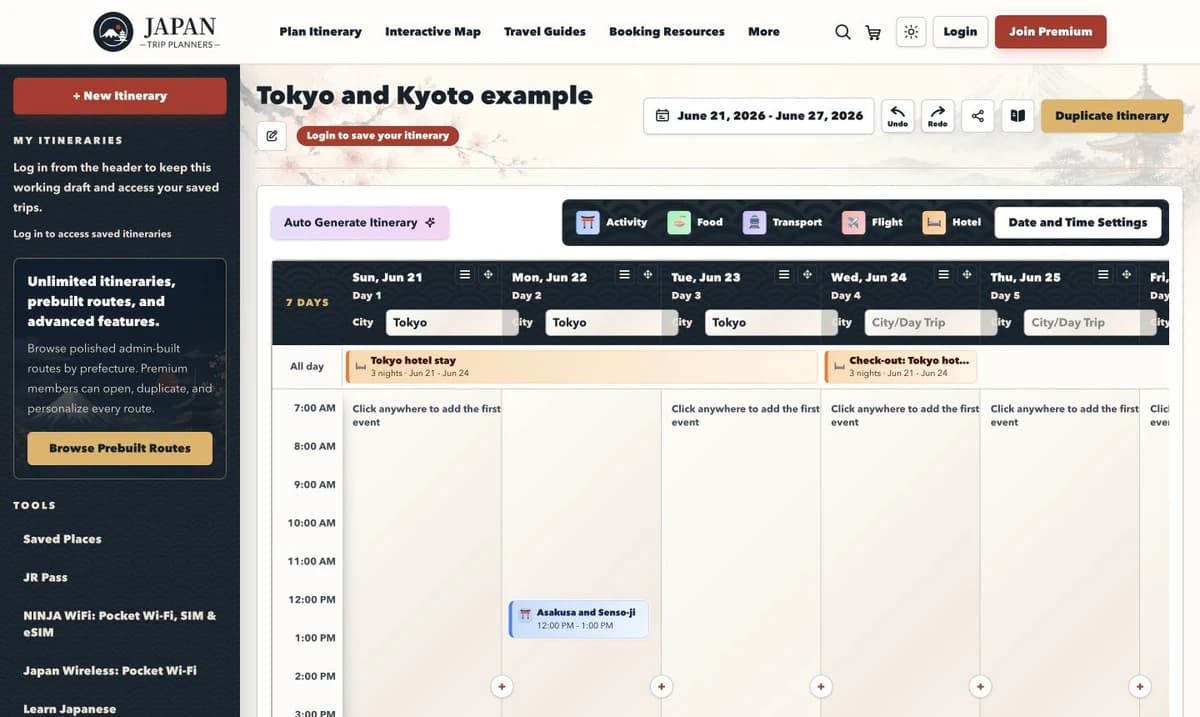
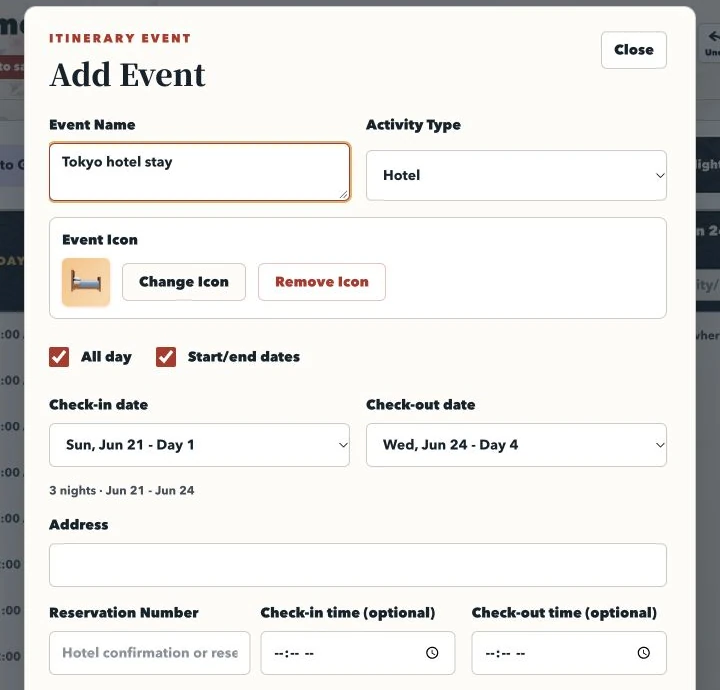
A multi-day hotel entry can sit in the optional all-day row so you can see where you are staying without covering the whole timed calendar. You can also keep check-in and checkout as short timed entries. Choose the representation that helps your group; you do not need a full-height hotel block on every day.
See the itinerary-builder tutorial for the date, event and hotel-stay controls.
Step 3: Put Fixed Bookings in Before Flexible Sightseeing
Choose the experience you would most regret missing in each city. It might be a Tokyo timed-entry attraction, an Osaka theme-park day, or a particular museum exhibition. Once you have a confirmed date and time, build around that commitment instead of squeezing it into the remaining space.
Use the calendar's event types to distinguish activities, food, transport, flights and accommodation. Add the address, useful notes and relevant ticket link where appropriate. A clear event title such as 'Train to Kyoto and hotel bag drop' communicates more than a vague block called Travel.
For every nonrefundable booking, ask what happens if the earlier event overruns. A museum with a flexible entry window and an airport departure have very different consequences. Leave larger buffers around the commitments you cannot simply move, and do not mistake a saved booking link for a confirmed reservation.
Step 4: Use the Map to Make Each City Day More Coherent
The map and calendar solve different halves of the same problem. The map helps you see where places sit; the calendar helps you decide when to visit them. In Osaka, a Tennoji, Shinsekai and Abeno-focused day is a different proposition from one built around Umeda or the bay. Seeing the geography first reduces accidental backtracking.
Save places that genuinely interest you, then make a smaller daily shortlist. One main experience, a meal and one or two nearby possibilities is a useful starting structure. Save additional ideas without forcing them onto the calendar. That way a rainy morning or a tired group does not require rebuilding the whole trip.
Public map browsing and 2D/3D views do not require paid Premium. The extra value of Premium is curated additional layers and the ability to create private pins for your own locations, alongside the other planning tools. The map is not a live train timetable or turn-by-turn navigation service; check actual routes and operator information separately.
Explore the interactive Japan map and read what Free and Premium map access include.
When Editable Prebuilt Routes Save the Most Work
Paid Premium gives you access to over 100 premade itineraries that you can copy and edit. This is useful when the hardest part is deciding what a reasonable day looks like. Start with a route whose region and pace fit your trip, then adapt it to your dates, bookings and interests.
Do not treat a template as a reservation or a timetable guarantee. Replace experiences you do not want, check the current operating calendar and allow for your hotel's actual location. A route built for energetic adults may need shorter walking stretches and more breaks for your group.
For a multi-city trip, the value is a starting structure that you can personalize, not permission to put every destination into one journey. Copying a sensible Kyoto day is helpful; adding it unchanged after a long transfer without reviewing the timing is not.
What Auto Generate Itinerary Does, and What You Still Review
Auto Generate Itinerary creates an editable first draft around your trip details, city stays, interests and requested places. It helps you move past a blank calendar and gives you something concrete to improve. Tell it what matters: dates, the cities you actually want, your preferred pace and any fixed commitments.
After generation, review each day. Check that the places interest you, verify opening days and reservation needs, examine the travel blocks and leave realistic meal and rest time. Food suggestions can be a general meal plan rather than a promise of a particular restaurant. The generated draft does not book, hold or guarantee anything.
If an itinerary already contains events, the builder offers a choice before generation: overwrite those events, generate on a new itinerary, or go back. Choose a new itinerary when you want to compare approaches without replacing your current plan. A tool should make experimentation easier, not encourage you to discard work you wanted to keep.
Why Alternative Plans and Sharing Matter on a Longer Trip
Sometimes the real question is whether Hiroshima deserves two nights, whether to base in Kyoto or Osaka, or whether a day trip is worth another hotel change. Paid Premium lets you keep multiple itineraries and duplicate a working version before testing another idea. That is more useful than repeatedly overwriting the only calendar you understand.
Custom itinerary icons and colors can make a longer plan easier to scan. Use them consistently, for example to distinguish fixed reservations from flexible ideas, rather than decorating every event differently. The point is to make tomorrow's important commitments obvious at a glance.
A shareable, read-only itinerary link lets companions view the plan without editing your calendar. Keep private or sensitive details out of material you intend to share, and revoke the link when you no longer need it. Premium's itinerary PDF travel booklet export gives you an offline reference or something to print, not live updates after export.
Free vs. Paid Premium: What Is Included?
Free access is a practical place to begin: use one active itinerary, browse the public interactive map and build a day yourself. A multi-city trip does not automatically require a paid subscription. Try organizing a transfer day and a sightseeing day first; that shows you whether the basic workflow fits.
Paid Premium adds unlimited saved itineraries, duplication, shareable read-only links, custom icons and colors, editable prebuilt routes, Auto Generate Itinerary, Premium map layers, private pins, itinerary PDF booklets and ad-free use while your access is active. These are separate benefits; decide which ones you expect to use.
Paid Premium also includes online reading of all four travel guidebooks while membership is active. Paid guidebook PDFs for download and offline reading are separate purchases. Do not confuse exporting your own itinerary booklet with receiving downloadable copies of the published travel guides.
At the time of writing, standard prices are $9.99 USD monthly, $79.99 annually and $249 for Lifetime before applicable tax or eligible discounts. Monthly and Annual renew until canceled; Lifetime is a one-time payment. Annual includes the stated $5 guide credit after each verified payment, and Lifetime includes a $15 credit after its qualifying payment. Confirm the live price and terms before checkout.
View the full feature comparison and live pricing. Paid guidebook downloads remain separate from membership's online reading.
What Can You Test During the Three-Day Free Trial?
The trial is a separate checkout choice, not something automatically attached to every paid subscription button. It requires a payment card and starts billing the selected Monthly or Annual plan after three days unless you cancel before the trial ends. The normal paid Start Premium buttons begin paid access without a trial.
The trial includes one successfully auto-generated itinerary total. Restoring or retrying that draft does not create a fresh allowance, although you can keep editing it manually. Prebuilt route schedules are limited to Tokyo-only routes; other prefectures and multi-prefecture templates require paid Premium.
Trial reading is limited to three sample chapters: the 5-Day Tokyo Itinerary, the 5-Day Kyoto and Osaka Itinerary, and the 7-Day Tokyo to Hiroshima Itinerary in their respective guides. Full online access to all four books requires paid Premium. The sample chapters are not downloadable guide ownership.
Use the trial deliberately: set up a realistic trip, test the available tools and decide before the billing date. If comparing a Kyoto or Hiroshima template is essential to your decision, remember that those full route schedules are not part of the Tokyo-only trial library.
Review the trial offer and current checkout terms before entering payment details.
Is Japan Trip Planners Premium Worth Paying For?
Premium is most compelling when you can name the planning work it will remove. For example: you want to compare two versions of a multi-city route, start from editable regional itineraries, read the guides alongside the calendar and keep your own hotel or meeting pins on the map. Those tasks make the tools relevant rather than merely attractive.
For a single trip, a Monthly plan may be the simplest way to try the full paid feature set without committing to a year. Annual makes more sense when you expect to plan over a longer period or return to the tools across several trips. Lifetime is a larger purchase for ongoing use; it is not automatically the best value for a one-off itinerary.
Stay Free if one active plan, manual editing and public map coverage do what you need. If removing ads is your only goal, the separate 90-day pass is a narrower option without Premium features or automatic renewal. Buying a larger membership is not necessary just to make the site ad-free.
Our view is that you are paying for a useful combination of our team's curated planning knowledge and tools that make it faster to organize your own decisions. There is no guaranteed money saving or perfect route. The value comes from using those tools to build a trip you understand and can adapt.
What the Planner Is Not: Bookings, Live Navigation or a Travel Agent
Premium is self-service planning software. It does not purchase flights, reserve accommodation, guarantee attraction availability or provide disruption support. You still book with the relevant supplier or partner and check the current terms. A calendar event labeled Hotel is not proof that a room exists in your name.
Our separately priced Personalized Trip service provides a research deliverable under its own scope and terms; it is not included in Premium. Choose it only if you want that separate assistance, rather than expecting a subscription to include a person organizing every booking.
During the trip, use the itinerary to remember what you decided, then confirm live departures, weather and opening information with the appropriate operator. Before leaving reliable internet, export a current itinerary PDF if your access includes that feature and keep essential confirmations available offline. The website itself should not be assumed to work offline.
Read about the separately priced Personalized Trip research service if you want that specific deliverable.
Questions About Planning and Premium Access
Is it an app? Japan Trip Planners is a browser-based website you can use on desktop and mobile. This article does not promise a native downloadable app, offline synchronization or live route tracking.
What happens if I cancel renewal? Access continues until the end of the current paid period or trial. When access ends, the Free account can use its most recently edited itinerary; other saved itineraries remain stored. Reactivating Premium restores access to those plans and saved Premium-layer places. Canceling renewal does not automatically refund the current period.
Can Premium replace all my other travel documents? No. Keep supplier confirmations, tickets and important addresses somewhere reliable. An editable planner helps organize the trip, but it does not replace travel documents or responsibility for checking the details.
How should I decide? Build one genuine day for free. If a specific Premium feature would make the next several days substantially easier to organize, compare the plans and choose the level that matches the time you expect to use it.
Start With a Trip You Can Actually Picture
Open the itinerary builder and add your dates, first base and one important commitment. Then use the map to choose a nearby place you would genuinely enjoy. When that first day feels workable, repeat the process for a transfer day before filling every empty slot.
That is the standard we want a Japan trip planner to meet: not the busiest calendar, but a personal route that makes sense when you look at it. Explore Free first, and choose Premium when the additional tools make that route easier to create, compare and take with you.
Build your first day for free or explore Premium for a more customizable trip.
Travel details can change. Confirm current schedules, opening hours, reservation rules, prices, and entry requirements with the relevant official provider before booking or traveling.